

A content workflow for B2B marketing is a decision system that determines what content gets created, why it exists, and how one idea compounds into multiple assets. Its purpose is to prevent random content creation, protect authority, and turn content into a scalable growth asset instead of a constant drain on time.
Unlike a content calendar, a workflow filters ideas before creation and designs distribution in advance.
If your content feels busy but nothing compounds, this is the problem. Content can look productive and still go nowhere. Blogs published. Posts scheduled. Clips shipped. Six months later, nothing feels easier. Nothing builds on the last thing. You’re creating constantly, but momentum never shows up. That’s not an ideas problem. It’s a workflow problem.
(Disclosure: Some links are affiliate links. I only recommend tools I personally use, at no extra cost to you.)
Why does most B2B content feel busy but never compound?
Most B2B teams start with a calendar, a tool, or a vague goal like awareness or consistency. So content becomes reactive. Each piece feels reasonable on its own, but together it creates noise. A calendar answers when something ships. A workflow answers whether it should exist. Without that decision layer, authority gets diluted, audience trust erodes, algorithms never learn who you are for, and teams burn energy without compounding return.
What is a content workflow for B2B marketing really?
A content workflow isn’t a checklist. And it’s not the same thing as a content strategy. Strategy sets direction. Workflow governs execution. A real content workflow answers three questions repeatedly: should this content exist, why does it exist, and how does it compound? If those questions are not answered clearly, content turns into activity instead of an asset. A founder content strategy is typically the source layer that feeds this workflow with the raw material it needs.
The B2B content workflow that actually scales
This is the exact system we use with lean B2B teams to produce high volumes of high-quality content without burnout, chaos, or random posting. Not by doing more. By deciding better.
1. Define content pillars with hard boundaries
This happens before goals, intent, or tools. Content pillars are authority lanes, not topics. Each pillar defines the problems you own, who you serve, the outcomes you’re known for, and what you do not cover. If an idea doesn’t live inside a pillar, it dies immediately. No research. No debate. No “but it might work.” This step protects authority, audience trust, and algorithm clarity.
2. Choose intent after the pillar
Only after an idea passes the pillar filter do you decide why it exists. Every asset gets one primary intent: SEO, YouTube discovery, authority building, or sales enablement. Pillars decide if something should exist. Intent decides how it should exist.
3. Validate demand inside the workflow
Research starts here. Not before. If the intent is SEO, are people searching for this in your niche and what exact question are they asking? If the intent is video or distribution, do similar assets perform consistently? No demand means no content.
4. Lock one question or one promise
Every long-form asset answers one thing. For SEO, one specific question. For video, one clear promise. If you can’t finish this sentence, the workflow stops: “By the end of this, you’ll know ___.” Vague topics don’t win. Clear answers do.
5. Create one core asset where humans win
Every workflow starts with one exceptional core asset: a long-form video, a podcast, an article, or a newsletter. Built from real client conversations, what actually broke, what actually worked, and what others consistently get wrong. This is not content creation. This is problem-solving in public. Humans lead here. Always.
6. Design for distribution before publishing
Before anything is recorded or written, it is structured to travel. That means clear sections, natural breakpoints, and standalone moments. You are not chopping content later. You are releasing it intentionally in multiple forms. This is how one idea turns into ten without chaos. For LinkedIn specifically, a strong LinkedIn marketing strategy for B2B tells you exactly how to sequence and distribute each content type on the platform.
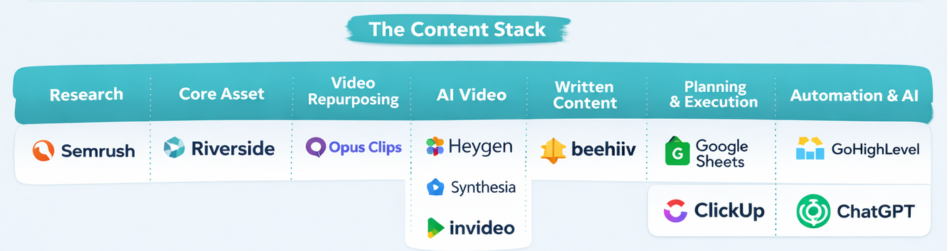
The Full Content Stack That Makes the System Manageable
Once the process is clear, the stack becomes obvious. These tools don’t decide what we create. They remove friction so the system actually runs. Every tool has a job. If it does not reduce effort or increase consistency, it does not belong.
Research and Demand Validation
We use Semrush to confirm real search demand, understand intent inside the niche, and identify keywords that actually matter. This prevents us from creating content that sounds good but never gets discovered.
Core Asset Creation
Riverside is where we record long-form video and audio. It gives us consistent recording quality, clean handoff to editors or agencies, and reliable capture of human insight. This is where expertise lives. Everything else is distribution.
Video Multiplication and Short Form
OpusClip helps identify clip-worthy moments, speed up short-form creation, and support YouTube Shorts and social platforms. It saves hours without deciding what actually ships. AI assists. Humans choose. For a full breakdown of the best AI video options for B2B teams, see the best AI video generator guide.
AI Video and Supporting Content
We use AI video tools selectively. Never for thought leadership. We use HeyGen, Synthesia, and InVideo to create content that supports SEO efforts. These tools are used for explainers, supporting clips, and consistent updates. They are never used to replace real expertise. They support distribution, not authority.
Written Content and Owned Audience
Long-form video feeds written content and email. We like Beehiiv when the goal is building a media-style newsletter, growing an owned audience, and compounding reach over time. For funnels, segmentation, and lifecycle messaging, we also use GoHighLevel.
Social Distribution and Scheduling
We use Publer for simple scheduling, reliable publishing, and support for personal LinkedIn profiles and carousels. GoHighLevel can also handle social scheduling, newsletters, and broadcasts when content is tied directly to automation, CRM, or funnels.
Visual and Carousel Content
We use AI Carousels to turn ideas into clean, scroll-friendly carousels, support authority on platforms like LinkedIn, and reduce design overhead for small teams.
Planning and Execution Management
Google Sheets is our planning system. We track content pillars, intent, core asset, repurposed outputs, and publishing cadence. ClickUp runs execution — managing tasks, owners, deadlines, offshore support, and agency handoffs.
Automation and Lifecycle
GoHighLevel ties content to email, newsletters, follow-ups, and pipelines. This is how content stops being awareness and starts supporting growth. It’s also the marketing automation system that connects everything together behind the scenes.
Takeaway
If your content feels chaotic, the fix isn’t better ideas or more output. It’s a workflow that filters ideas, protects authority, and lets one asset compound over time. That’s how this stays calm. And that’s how it scales.
If you want a structured framework for building your full marketing system, start with the 6-Week B2B Growth Sprint. Or if you want help building this inside your business, reach out.